Showing posts with label CSS3. Show all posts

Wednesday, February 03, 2010

Fixed positioning with WebApp.net

Introduction

It is actually not possible with mobile Safari to realize CSS fixed positioning. As a result of this constraint, iPhone web applications can not have fixed header or footer positioning natively.

Hopefully, there is a trick powered by several lines of javascript….Thanks a lot to cubiq.org !!!

This powerful javascript file allows you to include a scrollview to your webapp and choose to specify if you want an horizontal or vertical scrollbar…or both.

Of course, this trick is available for all webapp microframework and is working as well with WebApp.net !

Integration

This demonstration will show you how to include a fixed header to your WebApp.

  • Step1: Download the script from here.

This original script can be replaced by this one if you want to restrict scrolling to the correct direction. I have used the modified version for this demonstration.

  • Step2: Include the script in your webapp

You simply need to add the downloaded javascript in your html file.

image

  • Step3: Initialize the “scrolling framework”

In the WebApp.net load callback, you need to add the following code:

image

Add the following CSS style to your WebApp.net application as well

image

  • Step4: Add the wrapper in the WebApp.net application

Before the iGroup div block, include the wrapper and scroller divs as followed:

image

  • Step5: Enyoy !!!

You can take a look of the demonstration here.

Conclusion

This trick is really an interesting solution waiting for the native one provided by Apple...

Saturday, January 02, 2010

Scalable Image with GWT2.0 and DataResource

Introduction

Today, i wanted to use an ImageResource combined with an Image widget to display a resizable image. My first approach was not the good one !!! and it’s why i decided to write this note to provide the trick. Hopefully GWT2.0 has the solution !

Using ImageResource

When using ImageResource, GWT2.0 uses a CSS background url property to render the complete image and set automatically the width and height properties with the image original size. You can see the sources and related CSS just below.

image

image

image

Resizing the original image

My objective was to resize the original image. I tried to use the setSize method. When running the application, the image was cropped (0, 0, 400, 300) and not resized.

image

image

The problem with this ImageResource implementation is that a CSS background property is used and CSS does not allow to resize an image background yet.

The DataResource to the rescue !

The DataResource solution does not use the CSS background property but fills the img src property with the base64 encoded image. The image is correctly resized with the setSize() method.

image

image

image

Conclusion

When the objective is to display a simple image with the original size, using ImageResource is the good approach. When an image dimensioning is required, the DataResource is the solution !

del.icio.us Tags:

Tuesday, December 29, 2009

Rounded button, CSS3 and GWT2.0 ClientBundle

Introduction

CSS3 introduces new powerful capabilities for web designers. Instead of merging several sub-images to generate a rounded button, CSS3 allows to define this button with properties.

This tutorial will not only expose the CSS3 instructions to create the  button. The new GWT2.0 ClientBundle facility will be used to create a GWT RoundedButton.

The basic GWT Button will be used with a dedicated CSS3 style provided by a ClientBundle.

Let’s go !

ClientBundle introduction

GWT2.0 introduces this new  functionality bringing the power of combining and optimizing resources into one download for things like text files, CSS, and XML. This means fewer network roundtrips, which in turn can decrease application latency, especially on mobile applications.

More information regarding ClientBundle can be found here.

Step1: Creating the CSS clientBundle

The .iPush style is used to polish the button in the “normal state”. Basic attributes like color, font and positioning are described in this section. As CSS3 webkit implementation is used, you can notice that a \ is added in front of the webkit. without this \, GWT compile will fire an error during compilation.

The .iPush.IBClassic is used to add the rounded button properties. A “templated button image” is required to define the button properties. This image will automatically adapt is size regarding the text contained in the button or the button forced width.

image

@url annotation is used to define the “templated” image required to design the button(lines 182-183).

  • the @url annotation will produce the url CSS instruction
  • the imageUrl1 is the image referenced in the CSS instruction
  • the bigButtonWhite is a reference to a property defined in the ClientBundle java file in charge of locating the image (.png). This java file will be presented just after…

image

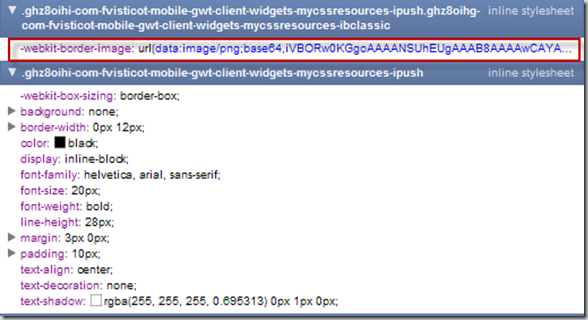
If we take a look at the generated CSS with the Chrome developer tools, we can see that the image has been base64 encoded during the GWT compilation !! no additional network access is used to download the image.
image

Step2: Creating the Java ClientBundle

The Resources interface is used to define all the resources (CSS files, images, JavaScript..) that are part of the bundle.

The previous CSS file is referenced by the @Source(“test.css”) annotation, the image location defined in the CSS file is defined in this interface as well.

image

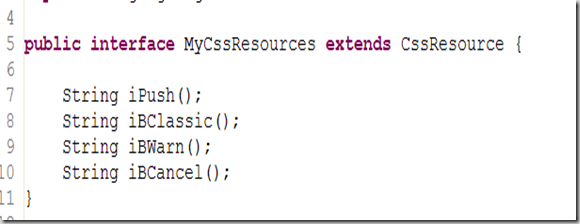
An other interface (MyCssResource) returned by the previous Resources interface is used to access the styles defined in the CSS file.
image

Using the button in the application

GWT.create method retrieves the Resources interface (56).

The button is “styled” with the MyCssResources iPush and iBClassic methods. This 2 methods are related to the .iPush and .iPush.iBClassic defined in the CSS file.

image

Finally, the resource is injected to the component (60)

And the result is:

image

Conclusion

This tutorial was for me the occasion to test the ClientBundle provided by the new GWT2.0 framework. Using ClientBundle seems really a good way to reduce the network transfers and only use the “active” part of the CSS.

Special thanks to Thomas Broyer who provide me efficient support !

del.icio.us Tags: ,,

Frederic shared items